OrynosMusic
Temporary Free phase · 5,000 weekly credits after verification

All modules and models are included for verified accounts. Each render uses the displayed model credit cost. Purchased credits remain in your account; new purchases are paused.

Sign in and verify your email to activate Free access. Sign in · Create account

Online mixing & mastering

Master your
music.

Choose a model. Upload your mix. Compare at matched volume before downloading your master.

InputThe original recording, before processing.

ProcessingTone, dynamics and peak control.

OutputThe Galaxy master. Listen below.

ORYNOS / MASTERINGGALAXY / MASTERING
Orynos Test Song20 SEC / STEREO
-14.007 LUFS-1.25 dBTP24 BIT / FLAC
TIME-FREQUENCY ENGINEINPUT → PROCESS → OUTPUT
Orynos Test Song, 0:00-0:20. Actual input and output envelopes from Galaxy 9.5.
8,465tracks mastered with OrynosMusicMaster your track ↗

Hear the difference.

One recording, six mastering paths. Switch versions at the same point and compare at matched volume.

0:00 / 0:20
Now comparingOriginal recording

Orynos Test Song 20 seconds 48 kHz

File loudness
-18.08 LUFS
Estimated true peak
-3.85 dBTP

Archived recordings use Aurora 10.0, Galaxy 9.5, Sun 9.1 and Premier 6.0. File measurements reflect the level before volume matching.

Matched using each excerpt's measured loudness.Measurements & downloads ↗

Choose the right finish.

Choose how to shape your mix, from a light correction to a more detailed premium master.

Premium

Orynos Whitehole V11.0

Adaptive tonal control for an open finish, with room for attacks and quieter detail.

Flagship Premium

Orynos Blackhole V11.0

All 15 Aurora tools, plus flagship resonance and density control. Includes spatial and high-resolution delivery.

V10.1 / Pro

Aurora

More context. A considered finish.

Independent auditory-band processing, separate attack and sustain control, and 15 additional tools. All existing finishing options, with optional restoration kept off until you choose it.

Inside Aurora / 15 additional tools
Auditory-band balance
Fine auditory-band corrections follow the source instead of a fixed brightening curve.
Resonance memory
Use persistence and harmonic context to distinguish narrow ringing from changing musical notes.
Attack / sustain separation
Give attacks and sustained energy separate correction budgets.
Bass de-bloom
Restrain sustained bass ringing without applying the same cut to every bass transient.
Low-mid de-box
Reduce persistent congestion between 180 and 650 Hz when detected.
Center detail
Use a restrained center-band correction while retaining the surrounding stereo image.
Selective sibilance control
Track relative high-frequency bursts instead of continuously reducing all treble.
Stereo center guard
Correct measured frequency-selective left/right imbalance conservatively.
Coherent delay repair
Opt in to correct a qualified coherent delay between stereo channels. Intentional stereo delays may be affected.
Harmonic hum repair
Opt in to attenuate qualified 50/60 Hz harmonic hum. Audition bass notes before keeping the result.
Sparse click repair
Opt in to reconstruct isolated impulsive outliers. Deliberate clicks can also be affected.
Flat-top peak repair
Opt in to reconstruct qualified short flat-topped peaks; lost source detail cannot be guaranteed.
Stationary noise control
Opt in to conservatively reduce stationary non-tonal residuals. Audition quiet detail and tails.
Source bandwidth guard
Avoid adaptive boosts beyond the measured useful bandwidth of the source.
High-frequency peak reserve
Allow a measured extra peak margin when upper-frequency energy makes reconstruction more demanding.

Compare at matched volume; an automated master does not replace a mastering engineer's creative judgment.

Same sourceAurora / signal path
  1. Auditory-band processing
  2. Attack / sustain budgets
  3. Qualified optional restoration
Aurora outputOrynos Test Song / 0:00-0:20
Loudness
-14.01 LUFS
Estimated true peak
-1.03 dBTP
Format
24 bit / FLAC
Orynos Test Song. Illustrated processing path. Measured output.
Spectral mastering

Galaxy

Spectral control for complex mixes.

Frequency-aware dynamics and transient repair. Stem unmasking for vocals, kick and bass. Optional shimmer reduction.

Independent spectral engineFull finishing controls
Same sourceGalaxy / signal path
  1. Moving spectral dynamics
  2. Onset and phase protection
  3. Whole-track peak control
Galaxy outputOrynos Test Song / 0:00-0:20
Loudness
-14.01 LUFS
Estimated true peak
-1.25 dBTP
Format
24 bit / FLAC
Orynos Test Song. Illustrated processing path. Measured output.
Precision mastering

Sun

Detailed, controlled mastering.

Onset-aware dynamics in three frequency bands. Broad spectral tone shaping, a centred low end and the full finishing controls.

Same sourceSun / signal path
  1. Three-band dynamics
  2. Broad spectral balance
  3. Low-bass stereo control
Sun outputOrynos Test Song / 0:00-0:20
Loudness
-14.01 LUFS
Estimated true peak
-1.0 dBTP
Format
24 bit / FLAC
Orynos Test Song. Illustrated processing path. Measured output.

Premier · V6.0
Lightweight mastering / 0 credits

Choose Premier ↗

Sound, with the numbers.

Archived Galaxy and Sun measurements on Orynos Test Song, including three excerpts and a full 187-second render.

Browse recorded comparisons ↗
Mean loudness target error0.0018 LU

Sun: 0.0015 LU
Closer to −14 LUFS is better target accuracy.

Full 187-second render7,642 ms

Sun: 6,535 ms
Same development host; DSP and report meters.

Target checks passed4 / 4

Within ±0.5 LU and at or below −0.95 dBTP.
Four related renders of one recording.

Check your master.

Hear the original and the output at matched volume. Inspect loudness, peak level and tone before you download.

Master your track ↗
Orynos Test Song / 0:00-0:20
Original-18.08 LUFS
Galaxy master-14.01 LUFS
Actual peak envelopes on the same amplitude scale. One recording; measurements are not a listening verdict.

From the browser to your session.

Arrange locally in Orynos Studio, or master during playback with the Realtime VST3.
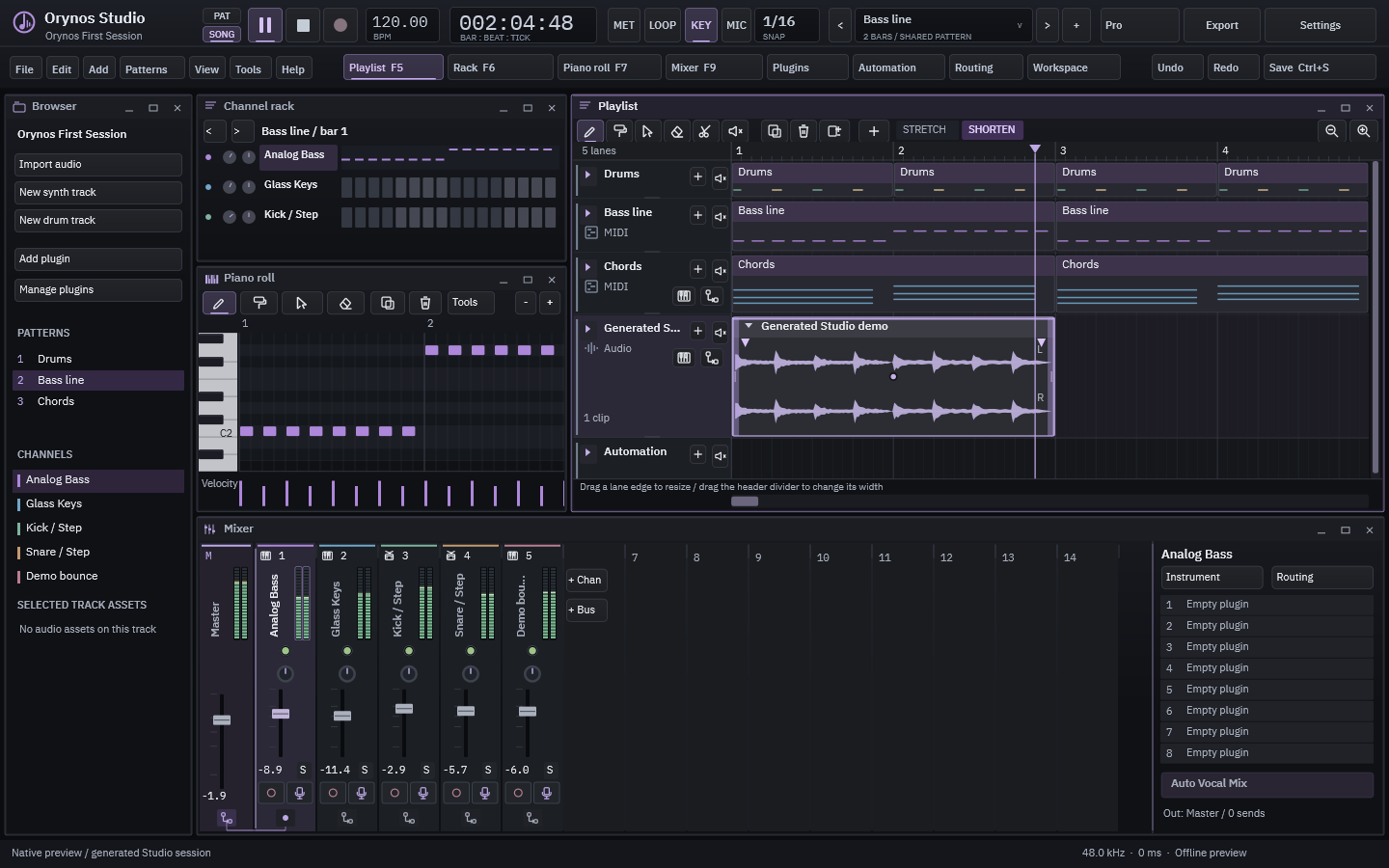
ORYNOS STUDIORECORD / ARRANGE / MIX
Actual Orynos Studio workspace with Playlist, transport and track controls
Orynos Studio. Actual Windows preview interface.

Orynos Studio

Record, arrange and mix. Export locally, then send a finished track to website mastering when you choose. New songs start with 50 empty Playlist tracks and Mixer inserts.

Explore Orynos Studio

Realtime VST3

Play 30 seconds, apply Auto Master and compare the original in your DAW. The audio stays local.

Explore the DAW plugin
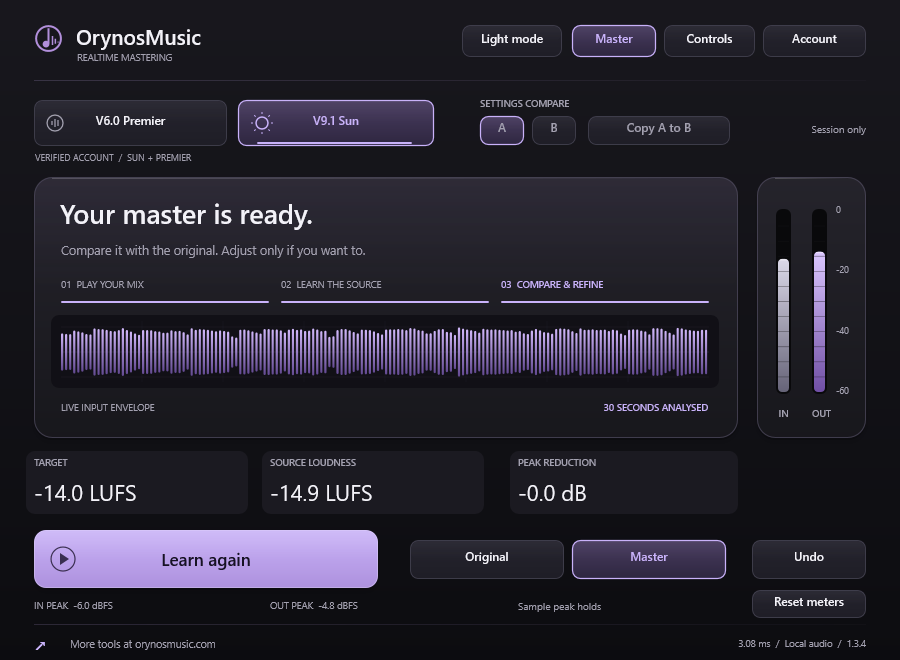
ORYNOS REALTIMELISTEN / MASTER / COMPARE
Actual OrynosMusic Realtime VST3 interface with Auto Master and Original Master controls
OrynosMusic Realtime VST3. Actual Windows preview interface.

Keep the session moving.

Mix your stems

Levels, buses and space. Finish with your chosen model.

Your reference profile

Use the measured balance of your favourite masters as a starting point.

Community

Share work, ask for feedback and meet other producers.

Check a track before mastering

Measure loudness, peaks and stereo balance in your browser. No upload or credits needed.

Finish your next track.

Master your track

Temporary Free access: 5,000 weekly credits after email verification. All modules and models included.
Audio is processed in RAM. Albums and multi-song batches stay available for one hour after completion. Single masters have five focused download minutes and a one-hour RAM limit. Published packs stay available.

Mixing & mastering guides.

Prepare your mix for mastering

Check clipping, export settings and the source before you upload.

Bring vocals and a beat together

Lead, doubles and space. Keep the instrumental working for the song.

Compare at matched loudness

Listen fairly and understand what the meters can tell you.

Choose a model and analysis mode

Different processing paths, supported modes and the credits each one uses.

All mixing & mastering guides

Practical steps for the session you are working on.

Confirm your email address to receive subscription and account notices.